Monitoring
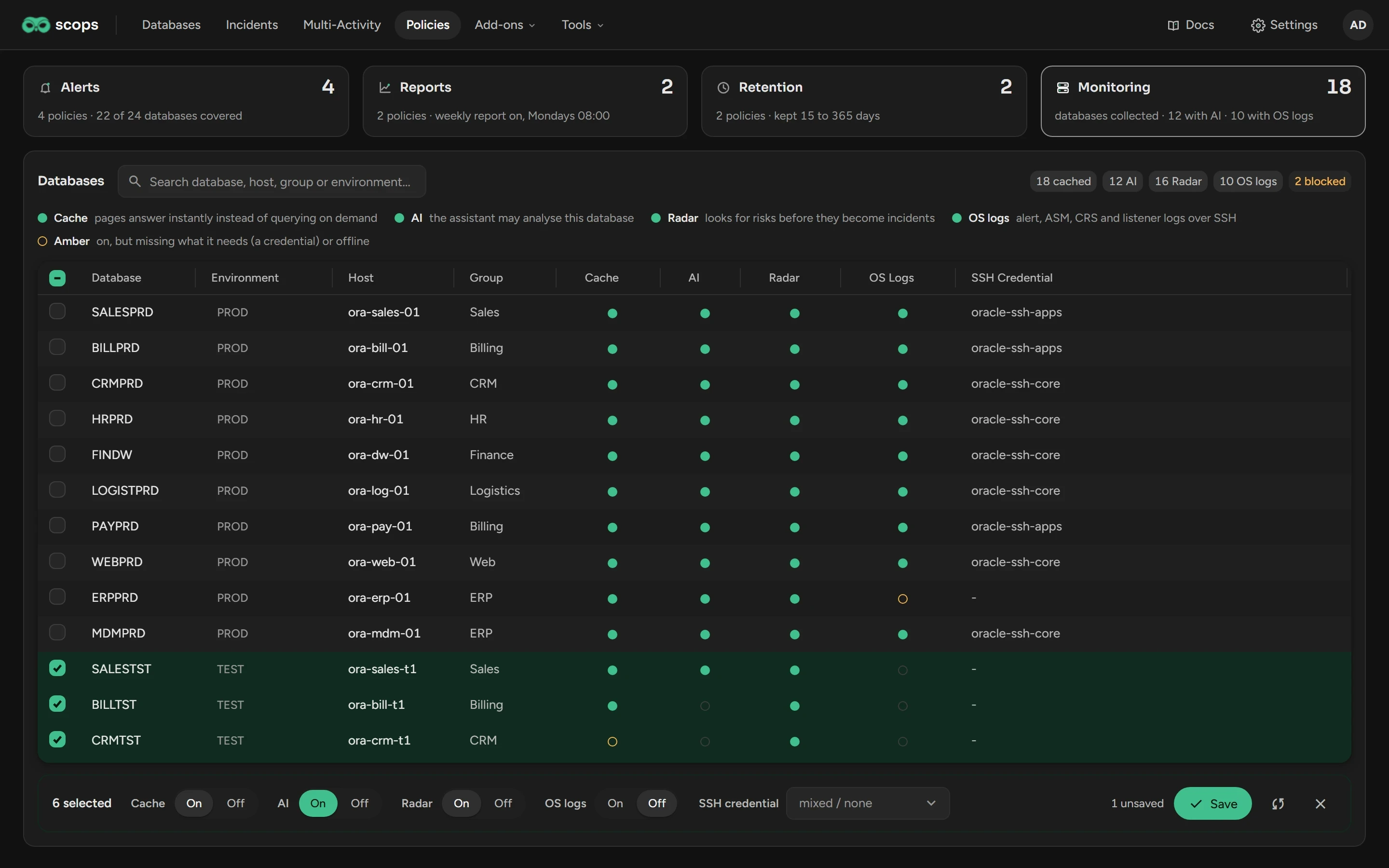
Monitoring turns four switches on or off for many databases at one time. Open Policies › Monitoring.
Before you begin
Changes need Manage databases. Monitoring is not a policy: each database has its own switches.
Change a switch
Select the databases.
In the bar at the bottom, click On or Off for each switch.
For OS logs, select an SSH credential if necessary.
Click Save.
When you turn off the cache, dbCove asks you to confirm. The pages of those databases become slower. dbCove does not record their change events, and they are not in the all-database views.
What the switches do
| Switch | When it is on |
|---|---|
| Cache | The pages of the database open at once. See Cache. |
| AI | dbCove AI can analyze the database. |
| Radar | Radar Engine looks for risks on the database. |
| OS Logs | dbCove reads the alert, ASM, CRS and listener logs over SSH. |
A filled dot is on. An empty ring is off. An amber ring is on but does not work: there is no credential, or the database is offline.
Cache and OS Logs are for Oracle databases. A SQL Server instance has the AI and Radar switches, and a PostgreSQL instance has Radar only. A dash (-) shows a switch that the database does not have. The bar at the bottom shows only the switches of the selected databases.
Related
Updated November 29, 2026