Troubleshooting
Find the cause of a problem and correct it. Run the commands on the dbCove server, in a command prompt opened as administrator.
The web page does not open
Open
https://localhost:5138on the server. If it opens there only, check the firewalls.In
services.msc, make sure that dbCoveApi and dbCoveWeb are Running. After an upgrade, dbCoveApi can stay Starting for some minutes.Check the port: see Find the address of a server.
Read the logs.
Internet Explorer cannot open dbCove. Use Edge, Chrome or Firefox.
Setup said verification failed
A service did not start. The Starting dbCove page of Setup shows the reason. Correct the cause and click Try Again. Or click Next, correct the cause later and start the services in services.msc. A silent installation ends with exit code 10.
The certificate warning
Browsers warn because dbCove starts with its own certificate. See Trust the dbCove certificate.
- The warning came back: dbCove renewed its certificate. Install the new
dbCove-ui.cer. - The warning shows for one address only: add the name to the certificate.
- dbCove does not use your company certificate: read the
HTTPS certificate:line of the dbCoveWeb log. - Firefox still warns: turn on its enterprise roots setting.
Reset the admin password
Run:
"C:\Program Files\dbCove\api\dbCove.Api.exe" --reset-admin-passwordType the new password two times (8 characters or more).
Sign in as
adminwith the new password.
To reset a different local user, add the name: --reset-admin-password jane.doe. If admin is missing, the command creates it again. The command does not change LDAP users.
A port is taken
- In Setup, the Ports page refuses a port that another program uses. Select a different port. To find the program, run
netstat -ano | findstr :5138. - After a change in Settings › Connection, if a saved port is not free at start, dbCoveWeb uses the ports in its configuration file. The Ports group shows a warning.
- If dbCoveApi does not start, remove the saved ports, then restart dbCoveWeb and dbCoveApi:
"C:\Program Files\dbCove\api\dbCove.Api.exe" --reset-portsThe sign-in page shows a notice
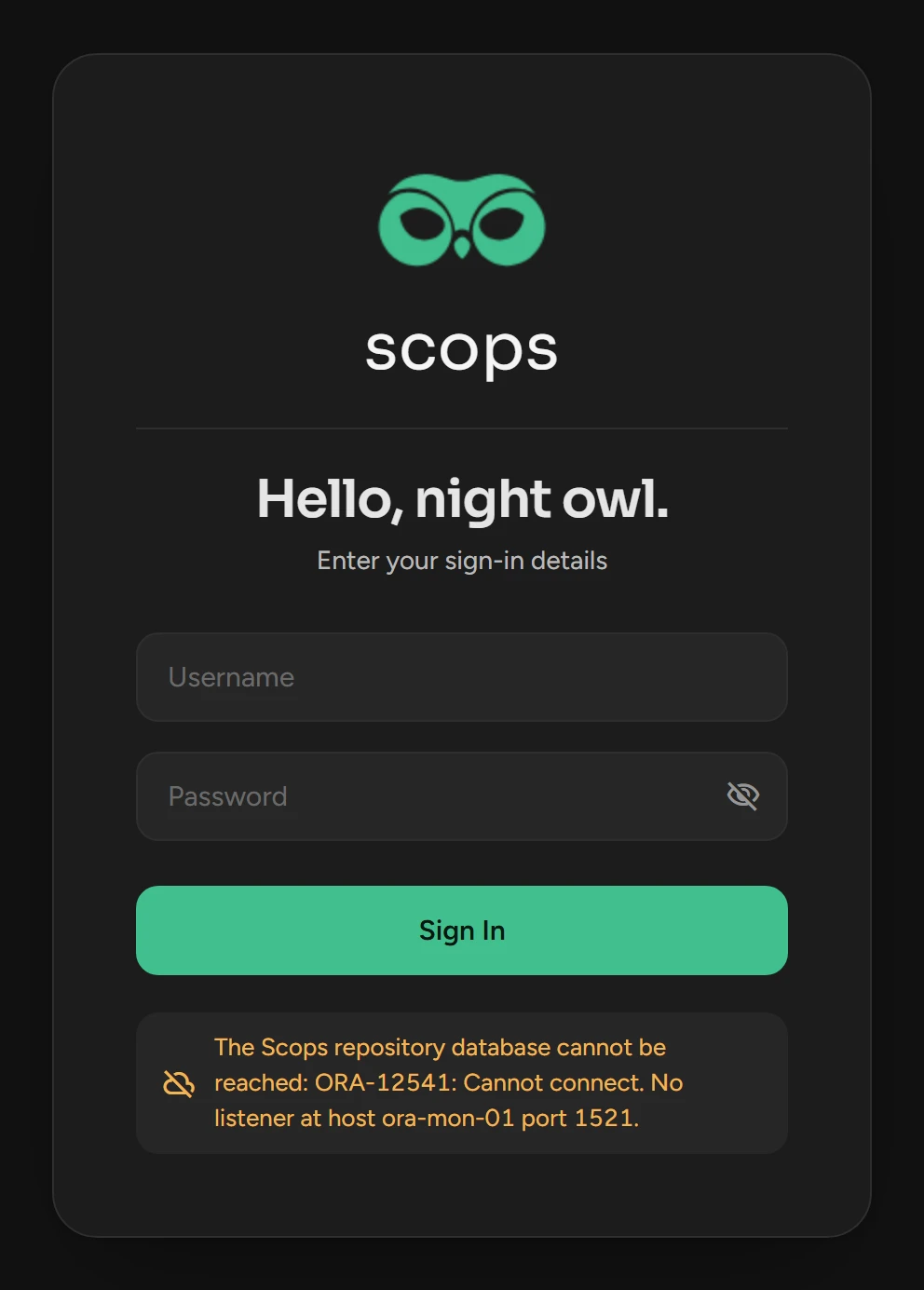
| The notice says | What to do |
|---|---|
| The dbCove repository database cannot be reached: Oracle error | Correct what the error names: the database, the listener or the account. dbCove starts all work again by itself. |
| dbCove is held: its repository schema is incomplete. | Sign in as an administrator and retry the failed step in Settings › Migrations. |
| The saved repository connection cannot be read on this server. | Run Setup again and enter the repository connection. |
| dbCove is not set up on this server yet | Run Setup. |
The repository moved or has a new password
In
C:\Program Files\dbCove\api\appsettings.json, replace the value ofcsRepowith the new connection string, in plain text:"ConnectionStrings": { "csRepo": "Data Source=(DESCRIPTION=(ADDRESS_LIST=(ADDRESS=(PROTOCOL=TCP)(HOST=ora-mon-01)(PORT=1521)))(CONNECT_DATA=(SERVER=DEDICATED)(SERVICE_NAME=DBCOVEREPO)));User Id=dbcove;Password=<password>" }Restart dbCoveApi and dbCoveWeb. dbCoveApi encrypts the value again.
The Under Maintenance page
This is not an outage. An administrator turned on maintenance mode in Settings › About, and only administrators can sign in.
A database cannot connect
For an Oracle database, Test Connection shows the Oracle error. For a database that you added, click its status mark on the Databases page.
| Error | Cause | What to do |
|---|---|---|
ORA-12541, ORA-12545 | No listener, or no such host. | Start the listener, or correct the host and port. |
ORA-12514 | The listener does not know the service. | Correct the service name. Make sure that the PDB is open. |
ORA-01034, ORA-27101, ORA-01033 | The instance is down, or it starts or stops. | Start the instance, or wait and test again. |
ORA-12528, ORA-01035 | The database allows only restricted sessions. | Wait for the startup, or end restricted mode. |
ORA-01109, ORA-01219 | The database is not open. | Open it. dbCove cannot monitor a mounted standby. |
ORA-01017 | Wrong user name or password. | Correct the credential in Settings › Security. |
ORA-28000, ORA-28001 | The account is locked, or its password expired. | Unlock the account, or set a new password and update the credential. |
ORA-01045 | No CREATE SESSION. | Grant it. See Database user privileges. |
ORA-12516, ORA-12519, ORA-12520, ORA-00020, ORA-00018 | No free process or session. | Check PROCESSES and SESSIONS. |
ORA-00257 | The archiver is stuck. | Free space in the archive log destination. |
ORA-50000 | No answer within the connection timeout. | Check the host, the port and the firewalls. The timeout is in Settings › Connection. |
An instance cannot connect
For a SQL Server or PostgreSQL instance, Test Connection says the cause and what to change. See If the SQL Server test fails and If the PostgreSQL test fails.
Find the logs
| Where | What |
|---|---|
| Settings › Logs | The log of dbCove in the repository. |
C:\Program Files\dbCove\api\logs\diag-<date>.log | Start, stop and failures of dbCoveApi. |
C:\Program Files\dbCove\api\logs\startup-crash.log | Why dbCoveApi could not start. |
C:\Program Files\dbCove\blazor\logs\diag-<date>.log | Start, stop, address and certificate of dbCoveWeb. |
C:\Program Files\dbCove\setup-logs\setup-<version>-<date>-<time>.log | Each run of Setup, from when you click Install. The last line is the last step of Setup. |
| Windows Event Viewer | Service starts and stops. |
dbCove keeps the diag logs for 30 days. Only administrators can read the logs and setup-logs folders.
Related
Updated November 29, 2026